
Email Radar: Chrome’s New “Email Verification Protocol”

Chrome’s Email Verification Protocol: A Deep Dive for Developers
If you’ve spent any time building signup flows, you already know the pattern. A user submits a form, your server checks the email syntax, maybe queries a disposable-domain blacklist, and then sends a verification link. It works, but it’s reactive. The bad email is already in your system by the time your server has a chance to reject it. That is why the movement toward a browser-level email verification protocol is so interesting. Chrome’s new email verification protocol aims to shift some of that detection earlier, right into the user’s browser, before the form even hits your backend.
This article is a developer-focused deep dive into what this protocol means, how it works under the hood, and why it won’t replace the kind of AI-powered email verification that tools like AntiTemp provide. You’ll also learn how to combine browser signals with a temporary email detection API for a layered defense that keeps both fraud and friction low.
1. The Context: Why Browsers Are Moving Toward Email Verification

The problem of temporary email addresses has exploded. Disposable email services let anyone create a working inbox in seconds, use it to bypass registration walls, claim free trials, or spam marketplace listings, and then abandon it. For product teams, this creates a toxic mix of fake accounts, inflated metrics, polluted lead databases, and higher fraud risk.
Traditional server-side checks help, but they arrive too late in the process. The request has already traveled over the network, your API has already spent cycles parsing it, and the malicious actor has already learned something about your defenses. Worse, many temporary email domains are new and obfuscated, so static blacklists miss them.
This is why browsers are moving toward email verification. By evaluating email-related signals directly in the client, the browser can warn users and block suspicious submissions before they leave the page. It’s not a silver bullet. But it represents a meaningful shift in how we think about verification: instead of a server-side gateway, email verification becomes a shared responsibility between the browser, the backend, and specialized APIs.
2. Understanding Chrome’s New Email Verification Protocol
Chrome’s new email verification protocol is a set of browser-level checks designed to identify risky or temporary email addresses during form interaction. It’s important to understand what it is not: it is not a replacement for server-side validation, and it does not give websites access to the user’s inbox. Instead, the protocol evaluates contextual signals that the browser can see and surfaces a trust signal or warning to the site.
Think of it as a radar sweep. Before the user clicks submit, Chrome can flag that the email address belongs to a known disposable domain or appears structurally suspicious. The site can then decide how to respond. The user-facing feedback might be as subtle as an inline warning or as strict as a blocked submission.
For developers, the key takeaway is that Chrome is becoming an active participant in email hygiene. That changes the architecture of signup flows. Instead of relying only on your backend, you can now treat the browser as a first-line filter. And when the browser’s signals are inconclusive, you can call a dedicated temporary email detection API like AntiTemp for a deeper, explainable risk assessment.
2.1 What the Protocol Does at the Browser Level
At its core, the protocol works by inspecting the email value in a form field and running a set of lightweight checks. These checks can include syntax validation, domain reputation lookups, and comparisons against known disposable email patterns. Because the browser controls the runtime environment, it can evaluate these signals instantly, without a round trip to your server.
This matters for user experience. A signup form that catches a typo or a throwaway domain before submission feels faster and more responsive. For security teams, it means fewer malicious requests reach the origin server in the first place. The browser acts as a pre-filter, reducing the load on your backend by rejecting the most obvious bad emails early.
2.2 How This Changes the Signup Experience
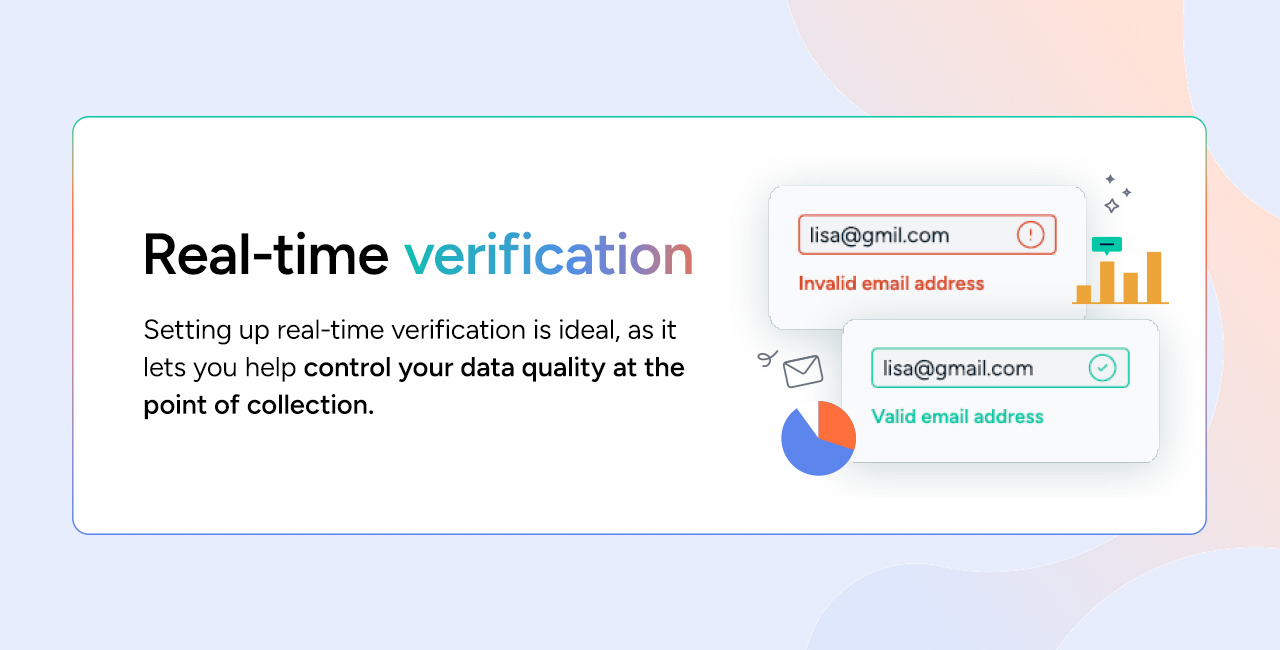
In practice, the protocol could make signup flows feel dramatically different. Imagine a user enters a temporary email address. Instead of filling out the entire form, clicking submit, and waiting for an error, they see an immediate inline message: “This email address appears to be temporary. Please use a permanent address.” That’s a better experience for legitimate users who accidentally typed a throwaway address, and a much higher barrier for bad actors.
But there’s a catch. The browser only sees what the browser can see. It doesn’t know whether a domain is a catch-all, whether the mailbox actually exists, or whether the address has been previously flagged in your company’s fraud database. That’s why the protocol is best understood as a complement to, not a replacement for, API-driven verification.
3. How Chrome Email Verification Works Under the Hood
Let’s talk mechanics. The protocol combines several techniques to evaluate an email address. The first is syntax checking, which is straightforward: does the email match a valid pattern? The second is domain reputation. Chrome can maintain a local list of known temporary email providers and cross-reference the email’s domain against it. The third is behavioral heuristics, such as how quickly the user typed the email, whether they used autofill, or whether the session shows signs of automation.
This is powerful, but it has limits. Browser-based heuristics are generic. They don’t know your specific abuse patterns. A domain that is benign for one business might be high-risk for another. A marketplace selling physical goods has a very different threat model than a newsletter signup form. Chrome’s protocol can only offer a general risk signal, not a nuanced decision.
3.1 Browser Signals vs. Server-Side Intelligence
Chrome can see the email field, the domain, and some user interaction signals. It cannot see whether the email inbox is active, whether the address has been used in previous fraudulent transactions, or whether it belongs to a role-based account like admin@company.com. This is the fundamental difference between browser signals and server-side intelligence.
A dedicated email verification API can perform SMTP checks, analyze mailbox status, inspect domain age and MX records, and compare the address against global fraud databases. AntiTemp’s AI-powered email verification, for example, goes beyond blacklists and evaluates structural and behavioral patterns to produce a risk score. That level of intelligence simply cannot run inside a browser without raising serious privacy and performance concerns.
3.2 The Role of Heuristics and Reputation Data
How do browsers identify temporary email domains? The same way email verification services do: by combining static blacklists with dynamic heuristics. A domain that was created yesterday, offers no SMTP service, or follows a predictable naming pattern is a likely candidate for disposable email use.
The challenge is that temporary email providers are aggressive. They constantly rotate domains, and many of them use custom domains that do not appear in any public blacklist. This is where machine learning models shine. Instead of waiting for a new domain to be manually reported, an AI-based system can detect the structural patterns of a throwaway address and flag it in real time.
3.3 Edge Cases Chrome Verification May Miss
There are several edge cases that Chrome’s protocol will likely miss. Catch-all domains accept mail for any address, so a syntax check and domain lookup will pass even though the user might be using a temporary inbox. Custom temporary email domains are another blind spot, because they have no established reputation. And role-based addresses like sales@ or support@ are not temporary by definition, but they are often unwanted in lead generation contexts.
None of these cases can be handled reliably by a browser alone. They require an API that can inspect deeper signals and provide an explainable verdict. That’s why the most robust verification stacks combine browser-level checks with server-side intelligence.
4. Why AI Email Verification Is Critical for the New Protocol
Chrome’s email verification protocol is a useful addition, but it’s not a complete email verification solution. The difference comes down to intelligence. Browser checks are largely rules-based. They can identify known disposable domains and suspicious patterns, but they struggle with nuance.
AI email verification, on the other hand, learns from large datasets of email behavior. It can recognize that an email address is temporary even if the domain has never been seen before. It can distinguish between a temporary address and a catch-all address. It can provide a risk score that your backend can use to make informed decisions, not just a binary “pass” or “block.”
4.1 From Rule-Based Lists to Machine Learning Models
Traditional disposable email detection relied on blacklists. A domain like mailinator.com would be hardcoded in a database, and any email address using that domain would be rejected. The problem is that new disposable domains appear every day, and blacklists are always playing catch-up.
Machine learning models flip this dynamic. They analyze features like domain age, domain name entropy, SMTP behavior, and historical abuse patterns. A model can flag a domain that looks structurally similar to known temporary email providers, even if it has never been seen before. This is the kind of intelligence that browser-level verification, with its limited local resources, simply cannot match.
4.2 Explainable Risk Scores: Knowing Why an Email Was Rejected
One of the most frustrating experiences for a user is being blocked without explanation. “Your email is invalid” is unhelpful when the user is trying to sign up for your product. Explainable risk scores solve this.
AntiTemp’s approach is built around this principle. Instead of returning a black-box reject, it returns a risk score along with the reasons behind that score. Was the domain blacklisted? Is the address suspicious because of its structural pattern? Does the domain have a low trust reputation? When you integrate this into a temporary email detection API, your product team can craft targeted error messages that guide users to provide a better email address instead of abandoning the form.
5. Temporary Email Detection API: What Developers Should Integrate
The emerging best practice is to treat Chrome’s protocol as a fast pre-filter and a temporary email detection API as the authoritative decision-maker. Here’s how to think about the integration.
First, let the browser run its checks. If the browser is confident that an email is temporary, you can surface a warning immediately. But you should not hard-block based on the browser alone. Instead, send the email address to your backend and run a verification API lookup. The API can confirm or override the browser’s judgment with far more context.
5.1 Real-Time API Verification During Checkout or Registration
Real-time API verification is essential for high-value actions like account creation, payment form submissions, and gated content downloads. In these scenarios, accuracy matters more than speed — but with AntiTemp, you don’t have to sacrifice one for the other. API responses come back in under 500 milliseconds, which is fast enough to keep the user experience smooth.
Here’s a minimal example of how you might call a temporary email detection API from a Node.js backend:
const response = await fetch('https://api.antitemp.com/v1/verify', {
  method: 'POST',
  headers: { 'Content-Type': 'application/json', 'X-API-Key': process.env.ANTITEMP_API_KEY },
  body: JSON.stringify({ email: 'user@example.com' })
});

const result = await response.json();
if (result.risk_score > 80) {
  // show a friendly error message
  return res.status(400).json({ error: 'Please use a permanent email address.' });
}
5.2 Batch Processing for Email List Cleaning
Temporary email detection isn’t only for real-time signups. If you have a legacy database full of leads, or if you’re preparing a marketing campaign, batch processing lets you clean your list before you send. You upload a CSV of email addresses, and the API analyzes each one against disposable email databases and AI models.
Batch processing is a different trade-off from real-time verification. Latency is less critical, but throughput and accuracy are paramount. You want to catch as many temporary addresses as possible without flagging legitimate users. By combining browser-level pre-checks with batch API cleaning, you can maintain a healthy email list over time.
5.3 Matching the Protocol with API-Driven Decisions
The smartest architecture is a fallback flow. When Chrome’s protocol produces a high-confidence risk signal, you can show an inline warning. When the signal is uncertain, you call the API. When the API returns a borderline score, you can send a verification email and let the user prove ownership.
This multi-layered approach ensures you never block a legitimate user based on a single signal, but you also never let a clearly temporary email slip through. The browser acts as the first net; the API is the safety net.
6. Real-World Implementation: Lessons from Production Signup Flows
Deploying browser-level email verification in production teaches you things that no documentation can. One of the first lessons is that user messages matter as much as the detection logic. If you tell a user their email is “invalid” when it’s actually temporary, they will be confused. If you say “This email looks temporary. Please use a permanent one,” they understand what to do.
Another lesson is about timing. Browser-level checks can feel instant, but API calls introduce latency. If you call the API on every keystroke, you’ll create a poor experience. Instead, debounce the input and trigger verification when the user leaves the email field or clicks submit.
6.1 What Early Adopters Report
Teams that have adopted browser-based verification report better threat visibility. They see a measurable drop in fake signups before the data ever hits their CRM. However, they also report an increase in support tickets from users who are confused by warnings. This is why clear copy and explainable scores are so important.
6.2 Common Pitfalls to Avoid
The most common mistake is over-blocking. A single signal — like “domain is on a disposable list” — is not enough to reject a user. The second mistake is ignoring latency. An API that takes two seconds to respond will kill conversion on mobile networks. The third mistake is poor error copy. Automated messages that sound like accusation rather than help will frustrate legitimate users.
6.3 Balancing Conversion and Security
Balancing conversion and security is an ongoing process. The best teams measure the false positive rate and tune their risk thresholds accordingly. They also use progressive verification: lower friction for low-risk actions, and stricter checks for high-value actions. Browser-level verification plus an AI-powered API gives you the control to implement this balance.
7. Industry Best Practices for Email Verification Protocols
As email verification protocols evolve, a few industry best practices have emerged. The first is to never rely on a single source of truth. Browser signals are useful, but they should be combined with API intelligence and domain analysis. This layered approach is more resilient and reduces the risk of both false positives and false negatives.
7.1 Layered Verification: Browser, API, and Domain Analysis Together
A defensible architecture looks like this: the browser performs a preliminary syntax and disposable-domain check, the API performs a deep analysis of the email address and its domain, and your backend enforces business rules based on the combined risk score. This way, no single layer is a bottleneck, and your team can adjust the risk threshold without changing the client code.
7.2 Handling Edge Cases: Catch-All, Role-Based, and Disposable Emails
Each category of problematic email requires a different strategy. For catch-all domains, the verification API should check whether the domain accepts all mail and assign a lower trust score. For role-based emails like info@company.com, you may want to block them in B2B lead generation but allow them in customer support. For disposable emails, use a combination of blacklists and AI models to stay ahead of new domains.
7.3 What the Experts Say About Privacy and Data Handling
Browser-level verification raises important privacy questions. Any time the browser processes an email address, there is a risk of data leakage. The best practice is to perform as much verification as possible on the server side, and to be transparent with users about what data is collected. Compliance with GDPR and CCPA requires clear consent mechanisms and prompt data deletion practices.
8. Performance Benchmarks: Speed, Accuracy, and Reliability
When evaluating an email verification solution, you need measurable criteria. Accuracy is the most obvious, but latency and explainability are just as important for user-facing applications.
8.1 Measuring Verification Accuracy
In temporary email detection, we care about true positives, false positives, and false negatives. A true positive is a temporary email correctly flagged. A false positive is a legitimate email incorrectly blocked. A false negative is a temporary email that slips through. A good API minimizes both error types. AntiTemp documents over 95% accuracy, which means fewer legitimate users are blocked and fewer temporary addresses reach your system.
8.2 Latency and User Experience
Latency is critical. Every extra hundred milliseconds increases the chance that a user abandons your form. The best verification APIs are optimized for sub-500ms responses, which feels instantaneous to the end user. If you are using Chrome’s protocol for instant feedback, you should ensure your API verification runs in parallel or after submission, not synchronously on every keystroke.
8.3 Reliability Under High Volume
Verification services must handle bursts of traffic. A product launch can send thousands of signups per minute. Your temporary email detection API needs to scale horizontally and maintain high uptime. Batch processing is also important for cleaning large datasets without overwhelming the system.
9. When to Use Chrome’s Email Verification Protocol — and When Not To
Chrome’s email verification protocol is a great addition to many signup flows, but it is not the right primary tool for every scenario.
9.1 Ideal Use Cases for Browser-Level Verification
Browser-level verification is ideal for low-risk signups, such as newsletter subscriptions, community forums, and consumer applications where abuse has minimal financial impact. In these cases, blocking obvious temporary email domains is enough. The browser’s instant feedback improves the experience without adding backend load.
9.2 Situations Requiring a Dedicated Temporary Email Detection API
High-stakes scenarios demand more than browser checks. B2B lead generation, payment flows, marketplace onboarding, and any system that grants valuable resources or credits are prime targets for abuse. In those environments, you need a dedicated temporary email detection API with AI models, explainable risk scores, and real-time responses.
| Use Case | Browser-Level Verification | Temporary Email Detection API |
|---|---|---|
| Newsletter signup | ✅ Usually sufficient | Optional |
| Consumer app registration | ✅ Good first line | Recommended |
| B2B lead generation | ❌ Insufficient | ✅ Required |
| Payment and checkout | ❌ Insufficient | ✅ Required |
| Marketplace onboarding | ❌ Insufficient | ✅ Required |
10. The Future of Email Verification: What Comes After Chrome’s Protocol
The browser is becoming an active player in the fight against fake emails. But it’s important to keep expectations realistic. Chrome’s protocol is not a complete defense system. It’s a radar, not a missile shield.
10.1 The “Email Radar” Concept
Think of Chrome’s email verification protocol as an early-warning radar. It scans the horizon for known threats and flags things that look suspicious. But a radar can’t intercept every missile, and it won’t tell you whether a ship is carrying contraband. You need a deeper inspection layer — that’s where AI email verification and temporary email detection APIs come in.
10.2 Preparing for a Multi-Layer Verification Standard
The future of email verification is multi-layer. Browser protocols, API intelligence, and continuous monitoring will work together to create a verification ecosystem that adapts to new threats in real time. As a developer, the best thing you can do today is build your signup flow around this layered model. Combine Chrome’s protocol with an AI-powered service like AntiTemp, measure the results, and tune your thresholds based on real data.
By doing that, you’ll be ready for whatever comes next — without sacrificing user experience or leaving your door open to abuse.